How to start a guided practice?
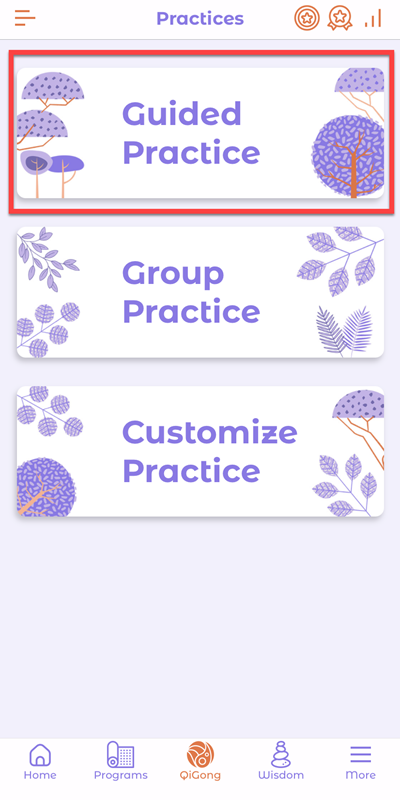
1st Step: After completing a lesson, go to QiGong on the bottom bar

2nd Step: Tap to select Guided Practice
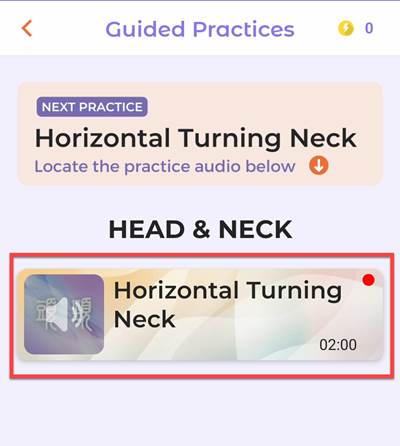
3rd Step: Select and tap an audio card to play the guided practice
Next tip: how to join a group practice?

1st Step: After completing a lesson, go to QiGong on the bottom bar
2nd Step: Tap to select Guided Practice
3rd Step: Select and tap an audio card to play the guided practice
Next tip: how to join a group practice?

Onenergy is pronounced as [One-Nergy], which refers to the source of creation. Everything and every life come from this one source. Onenergy Qigong is to help you to realize that you are more than this body and mind. Download Onenergy APP to learn and practice Qigong, meditation, and more. Available at Apple APP Store and Google Play Store.
1st Step: Go to QiGong on the bottom bar 2nd Step: Tap to select Customize Practice 3rd Step: Watch the demo video for detailed steps Next tip: how to claim qi points?
You will be rewarded with qi points every time you complete a lesson or a practice. The qi points indicate your effort in using our App to learn and practice qigong. With qi points leader board (coming soon), you will know how your peers are doing. We use the qi points to show you how…
Without an account, you can: read articles, watch blog videos, read qigong quotes and Q&A Without an account, you can’t: enroll and learn qigong, do qigong practices (guided practice and group practice), customize practice routines, join webinars and live events, track practice progress, etc. Tap the “Create account” button on App Home to create a…

1st step: create an account or sign in Tap the “Create account” button to create a new account or the “Sign in” button to sign in to your existing account 2nd step: complete your profile Tap the “Complete your profile” banner to check your location and select the age group and gender. Tap Save to…
1st Step: Tap Quest/Milestone icons on the upper right corner or from the side menu 2nd Step: Claim your qi points and check your progress; watch the demo video for details Next tip: what are qi points for?
1st Step: Enroll in a course Go to Programs, select and tap a course banner to check. Tap “Start Now” to enroll. 2nd Step: Start a lesson Select and tap a lesson to check. Tap to play the lesson video. 3rd Step: Complete a lesson When the video lesson is completed, tap “Mark Complete” to…